Sports & training · scheduling
Scheduling web app development case study: Snappy Stats, built on Laravel.
Three instructors, one spreadsheet, same lane twice. Snappy Stats is a scheduling web app built on Laravel for a growing shooting academy: replacing spreadsheets and manual coordination with a centralised, real-time booking system that prevents conflicts before they reach a member.
A double booking is not a software bug at a shooting range. It is a safety problem with a queue behind it.
- Industry
- Shooting academy · training centre
- Platform
- Laravel · MySQL · Tailwind CSS
- Engagement
- Discovery → MVP → iterative rollout
- Scale
- Single board of 100% schedule visibility
Scheduling, lanes, instructors & eventsDelivered · since retired
80%
Fewer double bookings
3–4 hrs
Saved per week on admin
100%
Schedule visibility
Shipped
MVP to rollout
About the client
About the client
The client runs a fast-growing shooting academy offering safety courses, training sessions and events for novice and experienced shooters. As bookings increased across several ranges, managing lanes, schedules and equipment became risky and time-consuming.
Multiple instructors, multiple ranges and hundreds of students every month meant the team needed a reliable way to coordinate classes, lanes and equipment. They wanted a solution that would scale with the academy, respect strict safety rules and still be simple enough for non-technical staff to use every day.
- Sports / training / education
- Scheduling
- Range & lane management
Client at a glance
- Business type
- Shooting academy & training centre
- Scale
- 10–30 instructors & admins
- Primary users
- Hundreds of members per month
- Previous system
- Spreadsheets, email, phone calls
- Our role
- UX, architecture, Laravel build, ongoing support
The challenge
Before Snappy Stats
The challenge
Bookings lived in a shared spreadsheet that three instructors edited at once. Two people could reserve the same lane for the same hour and nobody found out until they arrived.
Class capacity, lane availability and instructor rotas were tracked separately, so a change to one silently broke the other two.
Members paid in person or by transfer, and reconciling who had actually paid for which session took the office most of a morning every week.
Key challenges we uncovered
- Manual scheduling across spreadsheets and whiteboards, with no single source of truth.
- Limited visibility into upcoming capacity: nobody could see tomorrow clearly until the morning.
- No single source of truth for instructor availability across ranges.
- Difficulty accommodating a wide mix of event types such as safety courses, private sessions and group bookings.
- Lack of clear reporting on utilisation, cancellations and revenue per class, lane or instructor.
- Growing pressure to make bookings easier for members and reduce phone traffic to the office.
These challenges shaped the product goals, the architecture and the order we built things in.
Goals & success criteria
Project goals & success criteria.
Clear goals up front let us make intentional trade-offs during UX and engineering, and define what "successful launch" actually meant for the academy.
Business goals
- Eliminate double bookings and scheduling conflicts for lanes, classes and instructors.
- Give admins real-time visibility of today's schedule and upcoming events.
- Improve utilisation of instructors and ranges to increase revenue per available hour.
- Reduce time spent on manual coordination and status queries.
Product & technical goals
- Design an interface where booking a session takes fewer than four clicks on a phone.
- Implement a dependable, role-based access model for admins, instructors and support staff.
- Support multiple ranges and flexible event types without changing core code.
- Build on a modular, maintainable architecture with room for future integrations.
Success criteria
We agreed on a phased rollout: launch a focused MVP to the pilot range, validate that lane and instructor conflicts had genuinely disappeared, then extend to every class and event type.
Our solution
Our solution
QalbIT partnered with the academy to design and deliver Snappy Stats: a custom scheduling management web application built specifically for how a shooting range operates.
We started with an accurate discovery workshop, mapping real-world scenarios such as safety courses, private sessions and group events. From there, we designed a central schedule, a lane and instructor model, streamlined booking flows and customised conflict checks.
The application is built on a modular architecture, making it easy to add new event types, locations and reporting modules over time.
See how it works →Key solution pillars
End-to-end product design
Discovery, flows and interface, then engineering.
Laravel + MySQL foundation
Clean domain model, strict rules, room to grow.
Real-time conflict checks
Lane, instructor and equipment clashes caught at entry.
Modular architecture
New event types and ranges without touching core code.
Product features & UX
Key product features & UX highlights.
Everything the academy team needs to keep classes, lanes and instructors perfectly aligned in one place.
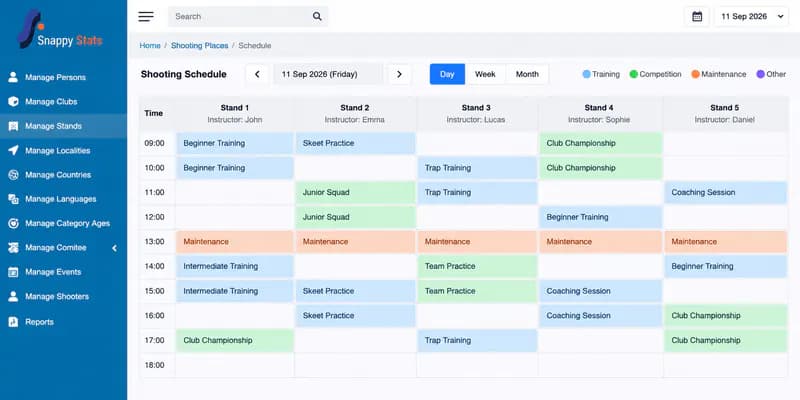
Central schedule board
A calendar-style board showing all classes, lanes and instructors, with filters by date, event type and range.
Role-based access & permissions
Separate views for admins, instructors and support staff, with permissions aligned to safety and operational policies.
Smart conflict detection
Automated checks prevent double booking of lanes, instructors or equipment when creating or editing an event.
Member & booking management
A simple record of registered participants, capacity details and booking history for each session.
Reusable event templates
Recurring classes and standard course formats are set up once and reused, rather than rebuilt every week.
Reporting & insights
Utilisation reports for bookings, cancellations and attendance, giving management better data for planning.
Architecture & stack
Architecture & technology stack.
The technology stack is deliberately simple, maintainable and aligned with the academy's long-term roadmap: powerful enough for today's needs without locking the product into unnecessary complexity.
Backend & infrastructure
- Laravel and PHP application layer handling modular business logic.
- MySQL database with well-defined tables for schedules, sessions, members and bookings.
- REST API prepared for future integrations or a mobile client.
- Role-based access control and audit trails for safety and compliance.
Frontend & UX
- Responsive web UI implemented with Tailwind CSS utility-first styling.
- Clear information hierarchy for schedules, lanes, tools and filters.
- Reusable components for cards, timelines, tables and forms.
- Accessibility-aware design with high contrast and keyboard-friendly forms.
- Laravel
- PHP 8
- MySQL
- Tailwind CSS
- REST API
- Blade
We chose a stack the academy's next developer can read on day one: no bespoke framework, no proprietary runtime, nothing that needs us to keep it running.
Delivery process & collaboration
Delivery process & collaboration.
We used a transparent, iterative delivery model with enough structure to keep momentum, and enough flexibility to adjust as we learnt from real usage.
- 012 weeks
Discovery & requirements
Stakeholder workshops, review of existing spreadsheets and current usage processes, and definition of core scheduling rules.
- 023 weeks
UX flows & interface design
User journeys for admins and instructors, wireframes for the schedule board and a design-led validation using the QalbIT design system.
- 036 weeks
MVP development
Core functionality built and hardened, delivered with regular demos, feedback loops and environment-ready deployments.
- 042 weeks
Pilot launch
Rolled out to a small pilot of users and instructors, with close monitoring of edge cases and improvements to conflict rules and logic.
- 05Ongoing
Rollout & ongoing support
Rolled out to all lanes and classes, plus a follow-up iteration on reports, templates and mobile-first booking flows.
Engagement model used
We started on a fixed-scope MVP, then moved to a lightweight ongoing engagement once the academy had validated the schedule board with real bookings.
- Fixed-scope MVPWritten scope, milestone billing
- Pilot before rolloutOne range, then all of them
- Ongoing iterationReports and templates after launch
Results & impact
Results & impact.
From reactive firefighting to proactive, data-informed scheduling.
- 80%Fewer double bookings
- 3–4 hrsSaved per week on admin
- 100%Schedule visibility
Story behind the numbers
By replacing spreadsheets with a purpose-built scheduling application, the academy went from firefighting conflicts to planning ahead. Instructors trust the schedule, admins spend their mornings on members rather than reconciliation, and management finally has utilisation data to plan growth with.
Client perspective
"I've work with this company on many web projects and mobile project and always they were very helpful and understand fast what we need and they develop what we ask in a good delay and price. I recommend this company for any project you have"
Related case studies
More work built the same way.
Different sectors, same discipline: written scope, sprint releases, and the client owning the code from day one.
Start here
Scheduling that fits your operation, not the other way around.
Tell us how your bookings work today and where they break. You get a written scope, an architecture recommendation and a price range within 48 hours.
- A written scope with the exclusions listed
- An architecture recommendation, not a sales deck
- The name of the engineer who would lead it
- Free, and yours to keep either way
Get your free estimate
Three quick questions: scope, approach and a price range back within 48 hours. No sales call required first.
Next step
Still running your schedule on a spreadsheet?
Send two lines about how your bookings work. You get a written scope, timeline and price range within 48 hours, free, and yours either way.
Keep exploring
Services demonstrated
Industry
Built with