Key takeaways
- Next.js is React with routing, per-route rendering, caching and image handling added; React still draws every component.
- Pick Next.js when pages must rank or load fast for first-time visitors, and plain React with Vite when every user signs in first.
- A widget embedded in someone else's page is a plain React job, because a Next.js app owns the whole document.
- Create React App was deprecated for new apps on 14 February 2025, so a plain React app now starts from a build tool such as Vite.
- A Next.js static export hosts as cheaply as plain React; Next.js on a server needs someone who patches it within days of an advisory.
SEO and first-load speed in Next.js and React
On search, the Next.js vs React gap is at its widest. A plain React app sends the browser an almost empty HTML page and a script tag. The words on the page appear only after that script downloads, runs and fetches its data. A page from Next.js arrives with the content already in the HTML, whether Next.js built it at deploy time or rendered it on request.
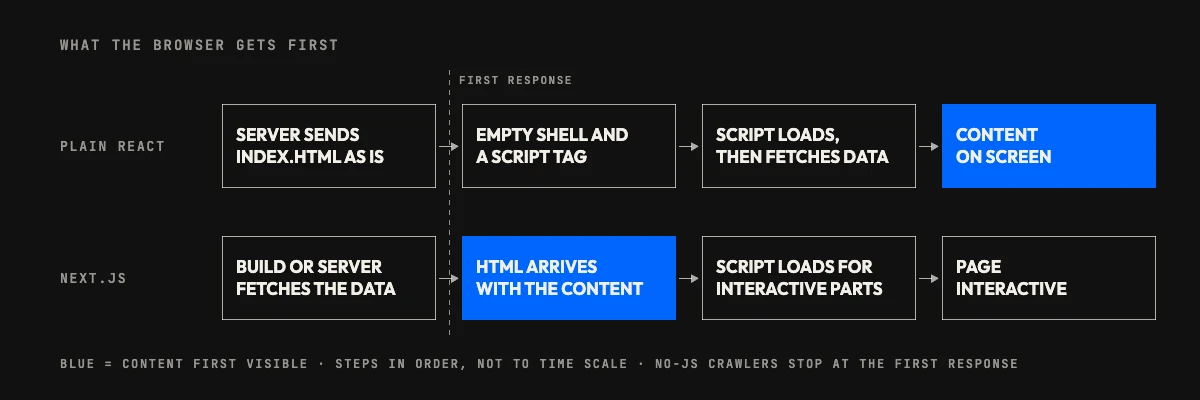
Google can still index a client-rendered page, but later. Its JavaScript SEO guide, last updated on 4 March 2026, says a page in the rendering queue “may stay on this queue for a few seconds, but it can take longer than that.” The same guide advises: “server-side or pre-rendering is still a great idea because it makes your website faster for users and crawlers, and not all bots can run JavaScript.” So for a page that people must find, HTML with the content in it is the safer default.
What server rendering does not fix
Server rendering moves a wait; it does not remove one. If an API is slow, a server-rendered page waits for it before sending anything. Streaming helps here, because Next.js can send the quick parts of a page first and fill in a slow section behind a Suspense boundary. A bloated client bundle also stays bloated. The real gain comes from rendering the parts that never need interaction on the server, so they add nothing to the JavaScript the browser downloads.
CyberFind, a B2B SaaS review platform we built, shows the pattern. The server renders its vendor and category pages because organic search is a core acquisition channel, while its filtering and comparison components are React. The CyberFind case study covers the rest of the stack.
Hosting and running cost of Next.js vs React
A plain React build is a folder of static files. Any CDN or object store can serve it, nothing runs between deploys, and the bill follows bandwidth. Your API costs the same whichever front end you choose, so leave it out of the sum.
Next.js has four ways to deploy, according to its deployment docs: a Node.js server, a Docker container, a static export, or a platform adapter. Only the server and the container support every feature. A static export is plain files again, so on hosting alone Next.js vs React is a draw. One line of config turns it on:
// next.config.ts
const nextConfig = { output: 'export' }
export default nextConfig
The static export guide lists what you give up. Incremental static regeneration, Server Actions, request cookies, redirects, rewrites, custom headers and image optimisation with the default loader all need a server. For a brochure site that list rarely matters. For a store with live stock, it usually does.
A server is something you patch
The cost most comparisons skip is security work. On 3 December 2025 the React team disclosed CVE-2025-55182, an unauthenticated remote code execution flaw in React Server Components rated CVSS 10.0, and named next among the affected frameworks. The advisory was clear about who could relax: “If your app’s React code does not use a server, your app is not affected by this vulnerability.” The team was still adding fixes for related denial-of-service flaws to it on 26 January 2026.
Earlier that year, a middleware bypass in Next.js, CVE-2025-29927, hit self-hosted apps. In their postmortem of 25 March 2025, the maintainers say they “immediately ruled out” static exports, since middleware needs a server, but confirmed the flaw in apps on next start and standalone output. For both flaws, a static front end had nothing to patch.
| Setup | What runs in production | Server features | Exposed to the two flaws above |
|---|---|---|---|
| Plain React, built with Vite | Static files on a CDN | None | No |
| Next.js static export | Static files on a CDN | Limited | No |
| Next.js on Node.js or Docker | A server process you run | All | Yes, on affected versions until upgraded |
| Next.js on a platform adapter | The platform’s runtime | Varies by platform | Some platforms shielded apps; you still upgrade |
So the true running cost of Next.js on a server includes someone who reads advisories and ships an upgrade within days. We carry that cost on this site knowingly. qalbit.com is a Next.js 16 app on a Node.js server. Its blog posts come from a headless WordPress, which tells the server to re-render a post whenever an editor publishes or changes it, with a ten-minute refresh as a fallback. These pages have to rank, so the server pays for itself.
Next.js vs React by project type
The Next.js vs React table below sorts each project type by who sees the first screen and whether search has to find it.
| Project | Build with | Why |
|---|---|---|
| Marketing site or landing pages | Next.js, often as a static export | Pages must rank and appear at once; a static export hosts as cheaply as plain files |
| Blog, docs or resource centre | Next.js | Many pages that change on a schedule, built ahead and regenerated |
| Online store | Next.js on a server | Product and category pages must rank and show live prices; the cart can stay client-side |
| SaaS product with public pages | Next.js | Pricing, features and docs need search; the signed-in app can render in the browser |
| Dashboard, admin panel or internal tool | Plain React with Vite | Nothing to index, and one static deploy beside your API |
| Customer portal | Plain React, unless the first screen is heavy | Server rendering helps only when the first view must carry real data |
| Widget on a site you do not own | Plain React | It mounts into one element; Next.js needs the whole document |
SaaS products need both halves
A SaaS product usually has a public half and a signed-in half. The public pages, such as pricing, features and docs, need search and a quick first load. Meanwhile the app behind the login behaves like a dashboard. One Next.js codebase can hold both: static routes for the marketing pages, client-rendered routes for the app, and server rendering only where a first screen needs live data.
A separate marketing site beside a Vite app also works, and it keeps the two release cycles apart. The deciding question is usually who edits the public pages. If marketers own them in a CMS, the split is cleaner. If the same engineers ship both, one codebase means one thing to run.
When Next.js is the wrong call
Next.js is the default in a lot of advice now, including React’s own docs. Even so, it is the wrong pick in these cases:
- Nobody will patch the server. If no one on the team will read a framework advisory and ship an upgrade within days, do not run Next.js on a server. Use a static export, or plain React.
- You are building a widget. It has to mount inside a page someone else controls, which plain React does and Next.js cannot.
- A working Create React App project with no search traffic. Move it to Vite first. That is the smaller step, and the React team points to a Next.js guide for moving to a client-only SPA if you want the framework later.
- A mobile app. Neither is the tool. React’s docs list Expo for native apps, built on React Native.
The reverse also holds. Plain React is the wrong call for a site that has to rank, because you would end up writing the server rendering yourself. The React docs warn that if your app later needs server rendering, static generation or Server Components without a framework, “you will have to implement those on your own.”
How to choose between Next.js and React
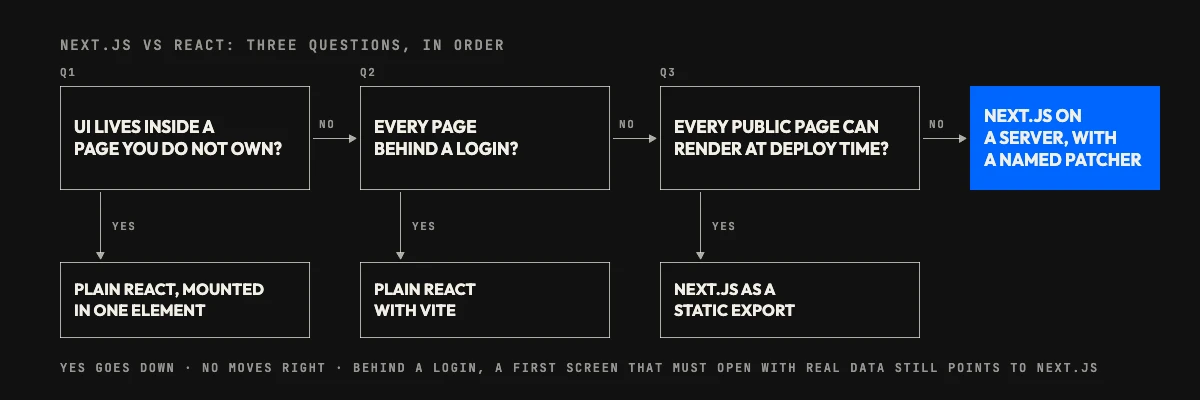
Three questions settle Next.js vs React on a real project. Ask them in this order:
- Does the interface live inside a page you do not own? Then it is plain React, mounted into one element.
- Is every page behind a login? Then it is plain React with Vite, unless the first screen must open with real data.
- Can every public page render at deploy time? Then it is Next.js as a static export. If not, it is Next.js on a server, with a named person who patches it.
A marketing site usually ends as a static export, while a store or a SaaS product with live public data ends on a server.
That is the call our written scope makes for your own routes rather than in general. Send two lines about the project, and you get a scope, a rendering-strategy recommendation and a price range within 48 hours.



Next.js vs React comes down to where each page takes shape: on a server or at deploy time with Next.js, or in the visitor’s browser with plain React. Next.js is React with routing, server rendering, caching and image handling added. Pick it when pages must rank in search or load fast for first-time visitors, as on a marketing site, a store or the public side of a SaaS product. Pick plain React, built with Vite, when every user signs in before seeing anything, or when the interface is a widget inside someone else’s page.