Key takeaways
- An inventory management system stores stock movements, not quantities: on hand is the sum of the ledger rows.
- Receipts, deliveries, transfers, adjustments, production issues and receipts, and returns move stock; orders only reserve it or put it on order.
- Reorder rules should read projected stock, available plus on order, or they raise a fresh purchase order every day until the first one lands.
- Under IAS 2, interchangeable stock is costed FIFO or by weighted average, so agree the formula with your accountant before go-live.
- A custom inventory module pays off for unusual units, batch tracking, stock-based pricing, approval rules or consignment; standard stock rules belong in a package.
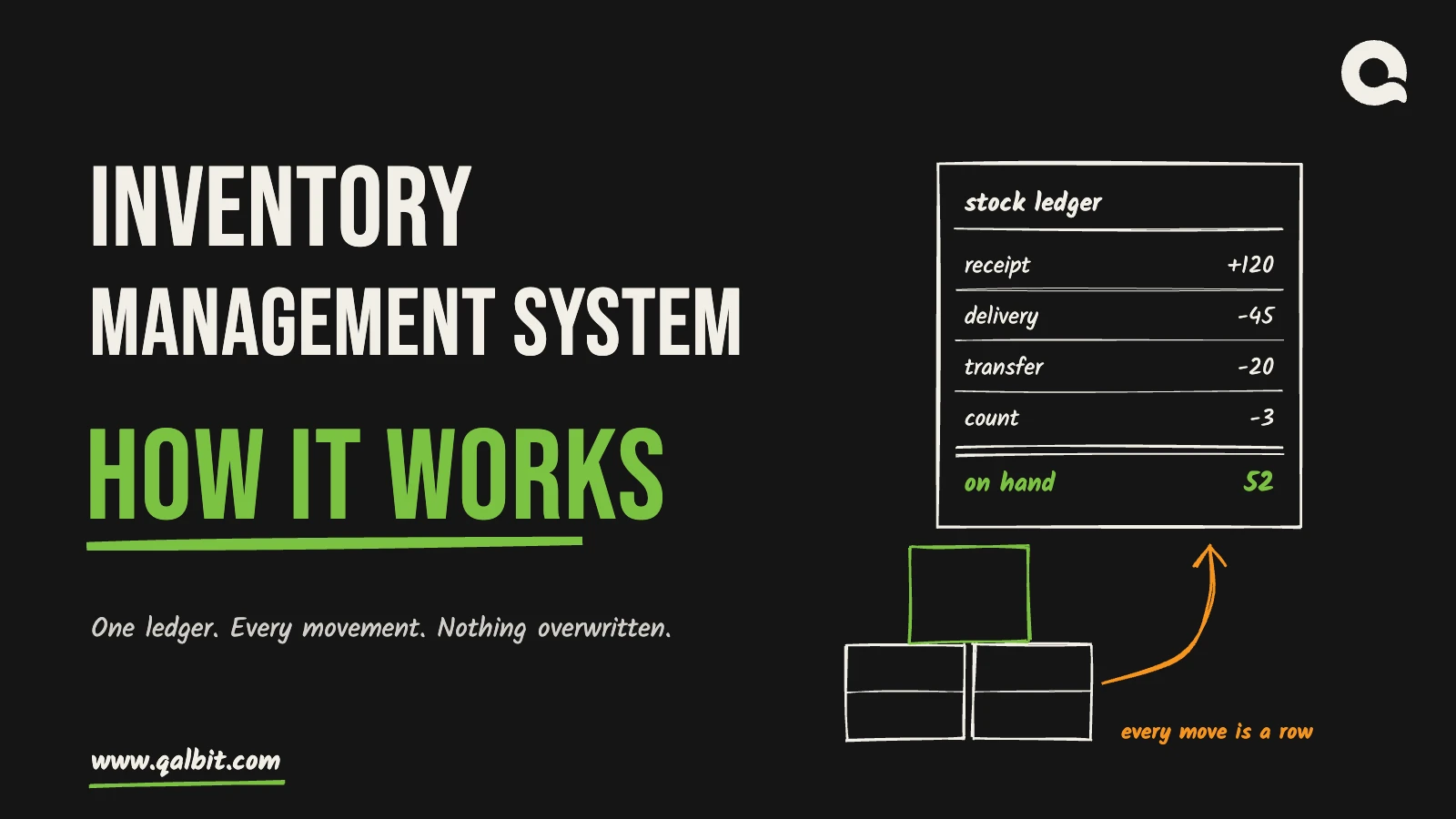
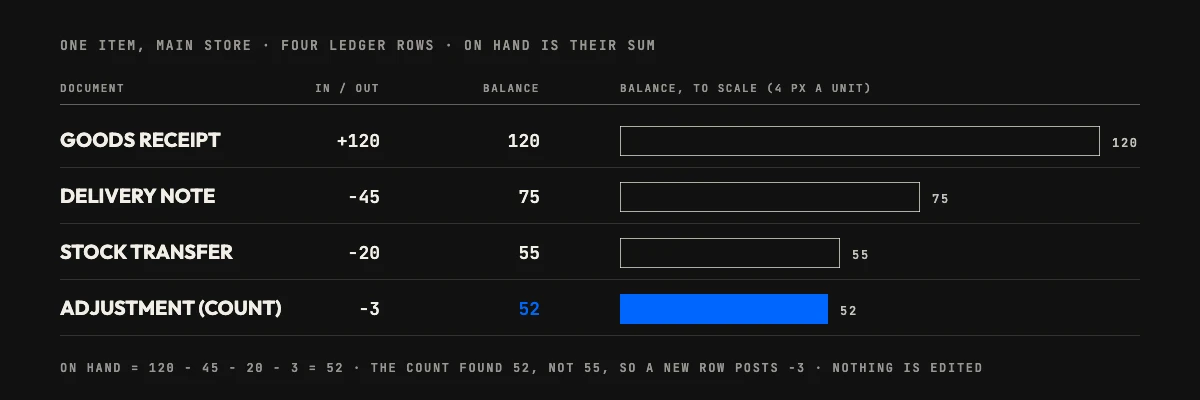
Because nothing is overwritten, every number has a history. When a count disagrees with the records, you can see which document made the difference and who posted it. We design the database with strict constraints around stock for the same reason. A correction is always a new, dated row with a reason attached, never an edited total.
The documents that move stock
Only a handful of documents change the ledger, and orders are not among them. A purchase order or a sales order is a promise. It changes what is on order or reserved, never what is on hand.
| Document | What it does to the ledger | When it is posted |
|---|---|---|
| Goods receipt note | Stock in, at the purchase cost | A supplier delivery is checked against its purchase order |
| Delivery note | Stock out, valued by the cost formula | Goods leave for a customer |
| Stock transfer | Out of one location, into another | Stock moves between sites, or into a van |
| Stock adjustment | In or out, with a reason code | A count, damage, expiry or a write-off |
| Material issue | Raw materials out to production | A work order starts |
| Production receipt | Finished goods in, at their built-up cost | A work order is completed |
| Return | In from a customer, or out to a supplier | Goods come back, or go back |
Each document also has a status. A delivery note in draft moves nothing, because posting it is what writes the rows. That matters for approvals. For example, an adjustment above a set value can wait for a manager before it posts, while the ledger stays clean in the meantime.
On hand, reserved, available and on order
One ledger produces several quantities. A screen that shows only one of them will mislead whoever reads it, so a good system shows them side by side:
- On hand: the sum of the ledger rows, meaning what is physically there if the records are honest.
- Reserved: stock promised to confirmed sales orders or work orders but not yet issued.
- Available: on hand minus reserved, which is what sales can promise today.
- On order: open purchase orders that have not been received yet.
- Projected: available plus on order. This is the figure reorder rules should read.
Valuation: what the stock is worth
Every receipt row carries a cost, and every issue row takes cost out. Then the cost formula decides how much. According to the IFRS Foundation’s summary of IAS 2, the IFRS standard for inventories (read on 25 November 2026), interchangeable items are costed by weighted average or first-in, first-out (FIFO). Meanwhile, items that are not interchangeable use specific identification, and LIFO is not among the formulas it names. The same page counts the cost of bringing stock to its present location and condition as part of its cost. That is why a good system lets freight be added to a receipt as landed cost.
Here is how the formula changes the numbers. Say you receive 100 units at $4.00, then 100 more at $5.00, and then issue 150.
| FIFO | Weighted average | |
|---|---|---|
| Cost of the 150 issued | $650 (100 at $4.00, then 50 at $5.00) | $675 (150 at $4.50) |
| Value of the 50 left | $250 | $225 |
| Total | $900 | $900 |
The total is the same either way, but the split between cost of sales and closing stock is not. So agree the formula with your accountant before go-live. Changing it later is an accounting decision, not a setting someone flips.
Reorder rules in an inventory system
A reorder rule answers two questions: when to order, and how much. The usual answer to the first is a reorder point. That is average daily usage multiplied by the supplier’s lead time in days, plus a safety stock for the days that run above average.
Say an item sells 40 a day, the supplier takes 7 days and you keep 80 as safety stock. The reorder point is 40 × 7 + 80, which is 360. With a fixed order of 600, stock that starts at 680 falls to 360 on day 8 and the order goes out. If usage holds at the average, it lands on day 15 just as stock touches the safety level of 80.
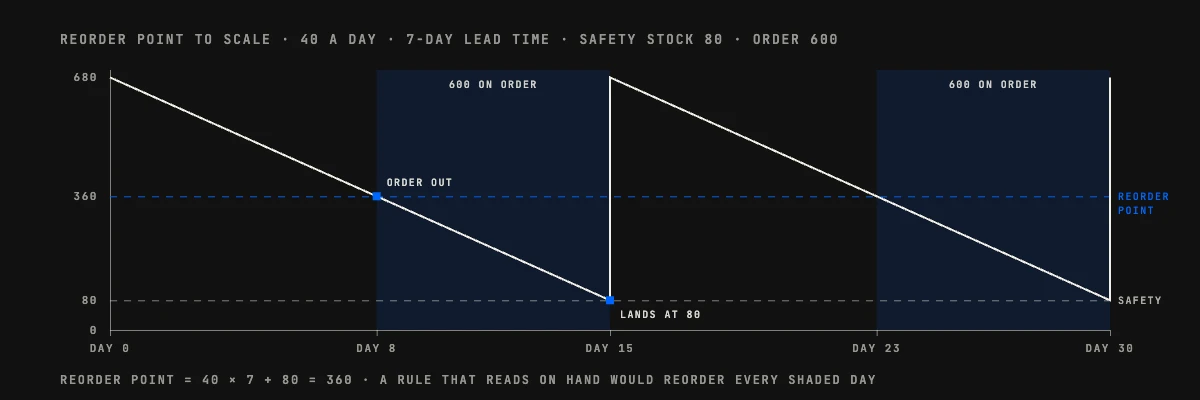
The rule must read projected stock, though, not on hand. Between day 8 and day 15, on hand sits below 360. A rule that reads on hand would raise a fresh purchase order on each of those days. A rule that reads projected stock sees the 600 already on order and waits.
Alternatively, many items run on minimum and maximum levels. When projected stock falls below the minimum, the system suggests enough to bring it back up to the maximum. Either way, the numbers only hold while lead times and usage stay current. That is why the system should compare the actual lead time of every receipt with the one stored on the item.
What an inventory management system connects to
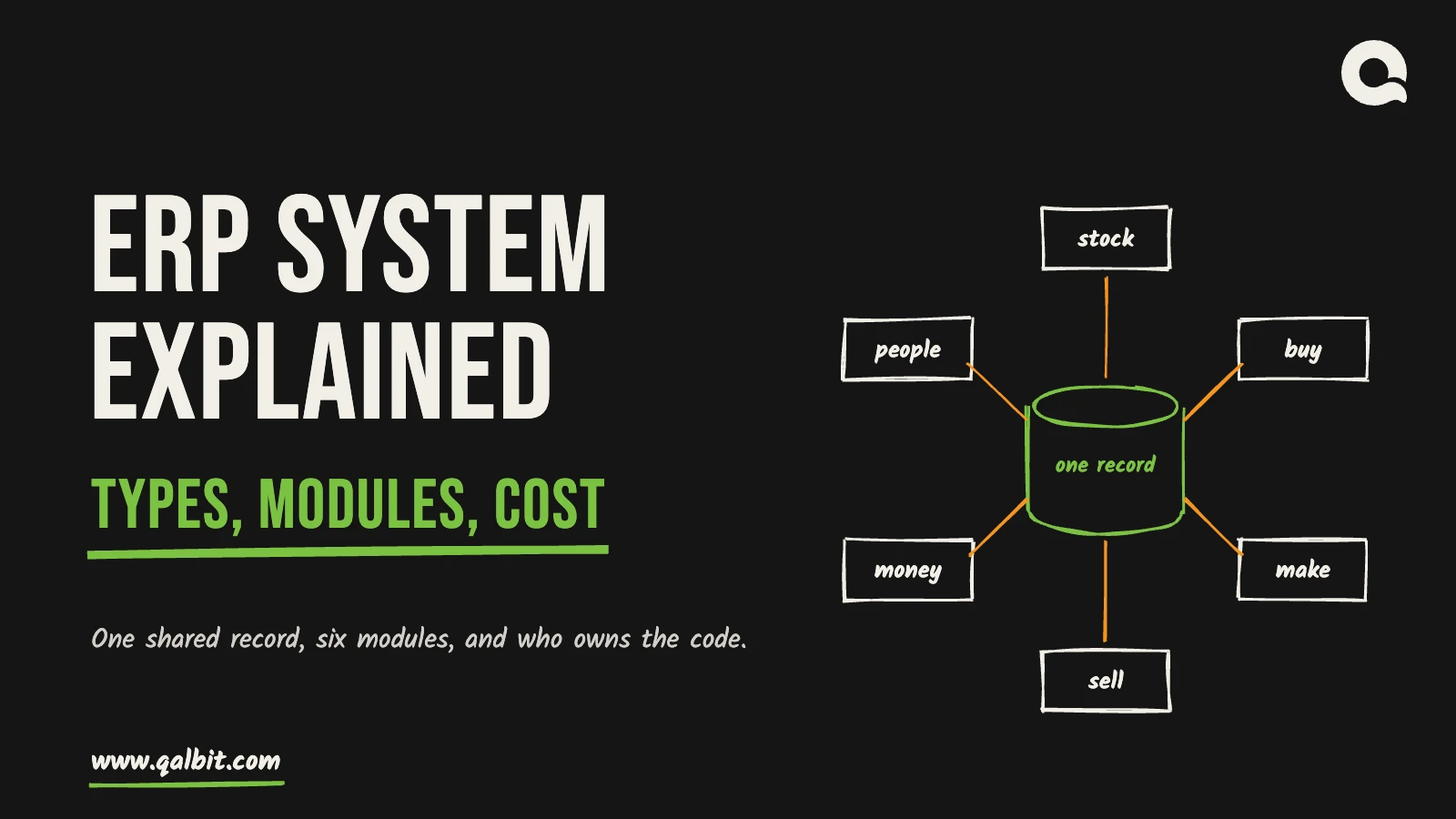
Inventory is the module the others write to. In an ERP, one sales order updates stock, purchase, production and accounts, and nobody types it in twice. This is what each connection carries.
| Module | What it sends to inventory | What it reads back |
|---|---|---|
| Purchase | Purchase orders (on order), goods receipts (stock in, at cost) | Projected stock and reorder suggestions |
| Sales | Sales orders (reserved), delivery notes (stock out), returns | Available quantity to promise |
| Production | Work orders (materials reserved), issues and production receipts | Material availability and batch details |
| Accounting | Nothing that moves stock | The value of each movement, for the stock and cost-of-sales accounts |
The goods receipt also lets accounts match a supplier invoice to what actually arrived, rather than to what was ordered. Meanwhile, accounting itself usually stays where it is. We keep the product a finance team already runs, because its staff and auditors trust it, and we sync stock values to it. QuickBooks Online, Xero and Zoho Books offer modern APIs, so that sync can run in real time. Tally, however, is different. It takes XML over HTTP with no webhooks, so it needs a middleware layer that checks both sides still agree.
Who does not need an inventory management system
Plenty of businesses are better off without one, or need less than a custom build:
- A service business whose only stock is printer paper.
- A business with a few dozen items, one location and one person who places every order. A spreadsheet and a monthly count will do.
- A business that needs bookkeeping with simple stock counts. That is an accounting product, not an ERP.
- A business whose stock rules are standard, with fewer than fifteen users and no unusual workflows. Buy a package and go live.
Also, if nobody will own the data, no system will help. Item codes go stale, counts stop, and within months the spreadsheet is back.
When a custom inventory system beats a package
A packaged inventory product works when your rules match its settings. A custom module pays off when the rules that make your business work are the ones the package cannot express. These are the signals we look for:
- Unusual units. Bought by weight and sold by count, rolls of different lengths, or one item stocked in two units at once.
- Batches that matter. Expiry dates, recall tracing and batch genealogy, which records which raw batch went into which finished one.
- Pricing tied to stock. A selling price set per batch, or worked out from the landed cost of the receipt it came from.
- Approval rules. Adjustments above a value, transfers signed off at both ends, and permissions limited to a user’s own locations.
- Stock you hold but do not own. Consignment stock, or raw material sitting with a subcontractor for job work.
- Allocation across locations. Deciding which site ships an order when several hold the item.
In practice, the right answer is often a hybrid. Keep the accounting product, build the inventory module around your own rules, and connect the two. Our guide to custom ERP development cost breaks down the price of a module by scope. To test the decision against your own user count and licence fees, try the build vs buy calculator.
Before you choose an inventory management system
Whichever route you take, do this groundwork first. It makes any vendor’s answers easier to compare, including ours.
- First, count your items and locations, and list every unit you buy and sell in.
- Next, list the documents that move stock today, including the informal ones. A phone message telling a driver to take ten boxes to the second shop is a transfer.
- Decide which items need batch or serial tracking, and why.
- Agree the cost formula with your accountant.
- Count your top items and record the gap between the shelf and the records. Then measure it again three months after go-live. That cycle-count variance is the clearest sign the system is working.
An inventory management system keeps one ledger of stock movements and works out three figures from it: what you hold, its value and when to reorder. Every goods receipt, delivery, transfer and count adds a row to that ledger, and nothing ever overwrites a quantity. That single rule is what separates a system from a spreadsheet. Below we walk through the ledger, the documents that write to it, valuation and reorder rules.