After gzip and brotli
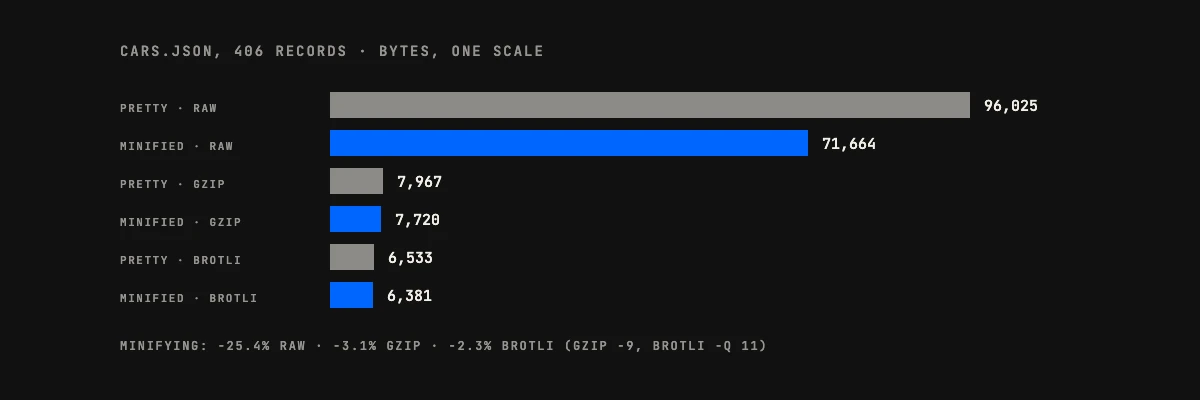
A browser does not download raw bytes, though. Servers normally compress text responses, and compression is very good at repeated whitespace, because a run of indentation is the most repetitive thing in the file. We compressed all four versions with gzip at level 9 and brotli at quality 11, the strongest settings of each.
| File | Form | gzip | brotli |
|---|---|---|---|
| cars.json | Pretty | 7,967 bytes | 6,533 bytes |
| cars.json | Minified | 7,720 bytes | 6,381 bytes |
| GitHub commit response | Pretty | 1,860 bytes | 1,612 bytes |
| GitHub commit response | Minified | 1,780 bytes | 1,551 bytes |
For cars.json, minifying cut the raw size by 25.4% and the gzip size by 3.1%, a difference of 247 bytes. Compressing the pretty-printed file saved far more than minifying it did: 7,967 bytes against 96,025, or 91.7% smaller, without touching the source. Brotli behaved the same way, with minifying worth 2.3% on top. The commit response saved 4.3% under gzip and 3.8% under brotli. Those are the strongest settings, and a server compressing on the fly usually runs lower. At level 6, gzip’s own default, minifying cars.json saved 5.6% of the gzip size (8,772 against 8,280 bytes). At level 1, which is nginx’s default, it saved 10.4% (12,402 against 11,115).
So whether to minify depends on whether the response is compressed, and how hard. If it is, minifying buys between 2% and 10% on top on these two files. If it is not, as with a JSON file inlined in HTML, copied into an environment variable or stored in a database column, minifying is the whole saving.
When to beautify JSON instead of minify it
Keep JSON beautified anywhere a person will read or change it. The cost is a few kilobytes in a repository.
- Config files and fixtures in a repository. They get edited by hand and reviewed in pull requests.
- Code review and diffs. Line-based tools compare lines. A beautified file puts each value on its own line, so a one-field change shows up as a one-line change.
- Debugging an API response. A nested payload on one line hides the missing field you are looking for.
- Documentation and examples. A reader copying a sample into their own code needs to see the structure.
The diff point is easy to underrate, so here it is on a real example. We changed one quantity in the same small order document, stored both ways, and ran git diff:
# pretty-printed file
-      "qty": 2
+      "qty": 3

# minified file
-{"id":1042,"customer":{"name":"Asha Patel","vip":true},"items":[{"sku":"A-1","qty":2},{"sku":"B-7","qty":1}],"note":null}
+{"id":1042,"customer":{"name":"Asha Patel","vip":true},"items":[{"sku":"A-1","qty":3},{"sku":"B-7","qty":1}],"note":null}
Git reports one changed line in both. In the first you can see the change. In the second you have to hunt for it, and in a document with a few hundred fields you will not find it.
When to minify JSON instead of beautify it
Minify when a program is the reader and the bytes cost something.
- Responses that are not compressed. Check the
Content-Encodingheader first. If it saysgziporbr, expect the 2 to 10% measured above, depending on the compression level. - JSON embedded in other formats. A script tag in HTML, an environment variable, a message queue payload or a database column all take the text as written.
- One record per line. Log pipelines and newline-delimited JSON need each object on a single line, which a minifier guarantees.
- Static files shipped to the browser. Translation bundles and lookup tables go through a build step, so minifying them costs nothing at run time.
On client projects we store beautified JSON in the repository and minify during the build or at the moment of writing to storage. The source stays reviewable, the shipped file stays small, and nobody edits the minified one by hand. Our earlier roundup, 7 developer micro tools for JSON and API tasks, lists other tools that fit this workflow.
JSON minify vs beautify in code
JavaScript and Python have this built in, and jq covers the terminal. Each parses first and then writes the structure back out, so each one also validates: invalid input fails instead of passing through. We ran every snippet below on Node 22, Python 3.9 and 3.13 and jq 1.7.1, and the output shown is what each one printed. The sample is one order document:
{"id":1042,"customer":{"name":"Asha Patel","vip":true},"items":[{"sku":"A-1","qty":2},{"sku":"B-7","qty":1}],"note":null}JavaScript and Node
JSON.stringify minifies by default. Pass a third argument to indent.
const order = { id: 1042, customer: { name: "Asha Patel", vip: true }, items: [{ sku: "A-1", qty: 2 }, { sku: "B-7", qty: 1 }], note: null };

console.log(JSON.stringify(order));          // minified
console.log(JSON.stringify(order, null, 2)); // 2-space indent
The first call prints the one-line form above. The second prints this, with every value on its own line:
{
  "id": 1042,
  "customer": {
    "name": "Asha Patel",
    "vip": true
  },
  "items": [
    {
      "sku": "A-1",
      "qty": 2
    },
    {
      "sku": "B-7",
      "qty": 1
    }
  ],
  "note": null
}
To convert text you already have, parse it and stringify it again: JSON.stringify(JSON.parse(text)) minifies, and adding null, 2 beautifies.
Python
Here is a trap. json.dumps is not minified by default. It puts a space after every comma and colon, so you have to pass the separators yourself.
import json

order = {"id": 1042, "customer": {"name": "Asha Patel", "vip": True}, "items": [{"sku": "A-1", "qty": 2}, {"sku": "B-7", "qty": 1}], "note": None}

print(json.dumps(order))                          # spaces after , and :
print(json.dumps(order, separators=(",", ":")))   # minified
print(json.dumps(order, indent=2))                # 2-space indent
The first line comes out as {"id": 1042, "customer": {"name": "Asha Patel", ... with spaces, the second as the compact line shown earlier, and the third matches the JavaScript output above. The compact separators produced a file byte-identical to Node’s JSON.stringify on cars.json.
jq and the command line
jq . order.json        # beautify (2 spaces)
jq -c . order.json     # minify to one line
jq --indent 4 . order.json

python3 -m json.tool --compact order.json   # minify
python3 -m json.tool --indent 2 order.json  # beautify
jq -c gave the same bytes as JSON.stringify on cars.json apart from the trailing newline jq adds. These are the quickest way to check an API response from a terminal, and they exit with an error on invalid input, which makes them usable in a CI step.
What minifying cannot fix: errors, comments and big numbers
A formatter parses before it prints, so it doubles as a validator. A trailing comma is the classic failure, and each tool names the position:
$ jq . bad.json                       # jq 1.7.1
jq: parse error: Expected another key-value pair at line 1, column 9

$ python3 -m json.tool bad.json       # Python 3.9 to 3.12
Expecting property name enclosed in double quotes: line 1 column 9 (char 8)

$ python3 -m json.tool bad.json       # Python 3.13 and later
Illegal trailing comma before end of object: line 1 column 8 (char 7)

Node 22: Expected double-quoted property name in JSON at position 8 (line 1 column 9)
The input was {"a": 1,}. Our tool reports line 1, column 9, as Node does, which matters once the error sits a few thousand lines down a file.
Comments fail the same way, since JSON has none. Given a file whose second line is // retries, Node stops with “Expected property name or ‘}’ in JSON at position 4 (line 2 column 3)”, and jq with “Invalid numeric literal at line 2, column 5”. If a config file needs comments, the file is probably JSONC or JSON5 and belongs to a tool that says so. Do not strip the comments and call the result JSON without checking what reads it.
Large identifiers need one more check. The JSON format puts no limit on numbers, but RFC 8259 lets software limit their range and precision and names IEEE 754 double precision as the widely used baseline, which is exactly what JavaScript uses. We fed it {"id": 12345678901234567890} and JSON.stringify(JSON.parse(text)) returned {"id":12345678901234567000}. Python and jq 1.7.1 returned the number unchanged. Removing the whitespace did not cause this; parsing into a JavaScript number did, and any browser-based formatter, ours included, parses that way. If your IDs are that large, check them with jq or Python, and send them as strings.
A short rule for JSON minify vs beautify
Decide by the reader and by whether compression is on. A person reads it: beautify. A program reads it over a compressed connection: either form, and minifying saves from 2% to about 10%. A program reads it with no compression, or it is embedded somewhere text is taken as written: minify. If you are unsure, keep the beautified file as the source and minify as a build step, since you can always go from one form to the other without losing anything.
If your team builds on APIs all day and wants the design reviewed by people who ship them, our backend and API development work is the place to start.



JSON minify vs beautify comes down to who reads the file: minify it when a machine does, beautify it when a person does, and the data stays identical. Measured on two real files, the whitespace costs about a quarter of the raw bytes in one and a tenth in the other, and 2% to 10% once the server compresses the response.
If you only need the conversion, paste your text into our free JSON minifier. It formats, validates and minifies in the browser, with 2-space, 4-space or tab indentation, and it never uploads what you paste. The rest of this post is for the moment you have to decide which form to keep in a repository, an API response or a config file. We build and run APIs for clients from our Ahmedabad office, so these are the rules our own team uses, with the numbers behind them.
JSON minify vs beautify: what actually changes
JSON allows “insignificant whitespace” between its tokens. RFC 8259 defines it as spaces, tabs, line feeds and carriage returns, and a parser skips all of it. Beautifying adds that whitespace back as line breaks and indentation. Minifying removes it. Both directions are lossless: a parser reads the minified and the beautified version of a document as exactly the same data, with one exception for very large numbers covered below.
There are also two things minifying is not. It does not shorten key names or drop null values, so
"customer_identifier"stays exactly that long. And it does not strip comments, because JSON has none to strip: the grammar in RFC 8259 has no comment syntax at all. A file with//lines in it is not JSON, and we come back to that below.JSON minify vs beautify in bytes: how much is saved?
Tool pages on this topic quote ranges such as “20–60%” with no method behind them. We wanted a number we could reproduce, so we took two public files, parsed each, and wrote it back out both ways. One is
cars.jsonfrom the vega-datasets repository, 406 records of nine fields each, pinned to the v3.2.1 commit. The other is the GitHub API response for that same commit, a nested object full of URLs, which we saved once and measured from that copy. Pretty here means 2-space indentation, the common default.Raw bytes
The saving depends on the shape of the data. Flat arrays of short records carry a lot of indentation per byte of content, so they shrink most. The GitHub response is mostly long URL strings with little structure, and removing the whitespace barely moves it. A single percentage in a tool’s marketing copy tells you little; your own file decides, and the size badge in the tool shows the number for yours.