Consumer apps · productivity
Flutter app development case study: Hellory, a smart reminder app.
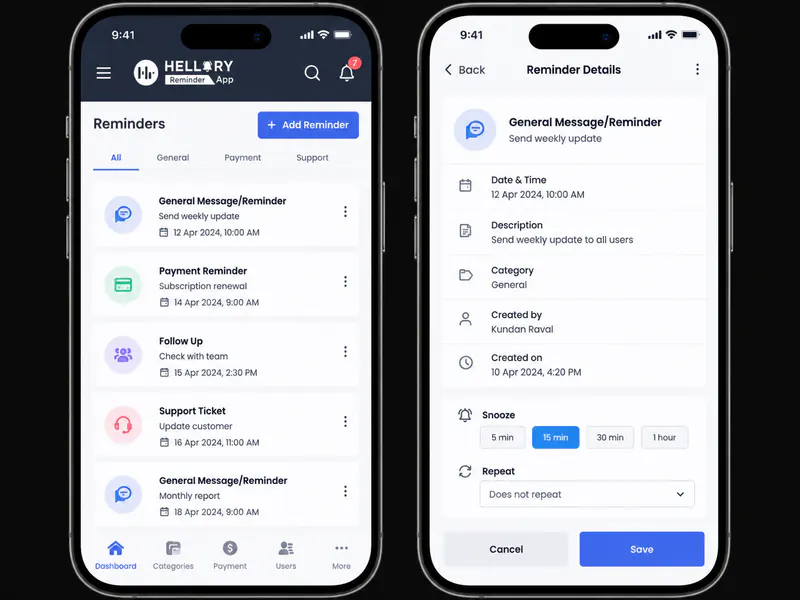
A reminder people do not dismiss at 7am. Hellory is a smart reminder app for busy lives: recurring reminders, templates and secure messaging in one Flutter product for iOS and Android, built so that creating a reminder is faster than remembering to.
A reminder app has one real competitor: the phone alarm already on the home screen. It has to be quicker than that.
- Product type
- Smart reminder & productivity app
- Platform
- Flutter · iOS & Android · Node.js API
- Engagement
- Concept → MVP → public launch
- Data model
- Offline-first, syncs when connected
Reminders, templates & secure messagingLive on both stores
~15s
To create a reminder
1
Codebase, two platforms
Offline
First, syncs on reconnect
Live
On iOS and Android
About the client
About the client
The Hellory team approached us with a clear-eyed view of the market: reminder apps are everywhere, and almost all of them stop at a simple alarm. They wanted to build one that could handle the reminders people actually forget: the recurring, shifting, slightly complicated ones.
The goal was to launch a genuinely useful consumer product with a clean, approachable interface, and to reach both iOS and Android without doubling the build. QalbIT partnered with the founders to turn this ambition into a production-ready cross-platform app backed by a secure API. The engagement began the way our MVP scoping for startups work usually does: one riskiest assumption, and a first release small enough to ship.
- Consumer apps / productivity
- Mobile
- Cross-platform
Client at a glance
- Product type
- Consumer productivity mobile app
- Primary users
- Busy professionals and families managing recurring tasks
- Platforms
- iOS and Android via a single codebase
- Our role
- Concept, UX, mobile and API build
- Engagement
- MVP through to public launch and support
The challenge
Before Hellory
The challenge
Most users juggled multiple reminder tools, a phone alarm, a note app, a shared calendar, and none of them handled a recurring commitment that shifts week to week.
Unified, context-aware reminders were the exception rather than the rule. Setting one up took more taps than the thing being remembered was worth.
Becoming a habit was the hard part. A reminder app only works if opening it feels lighter than the mental load it replaces.
Key challenges we uncovered
- Creating a reminder had to take fewer taps than setting a phone alarm, or nobody would switch.
- Recurring reminders that shift by working days, not calendar days, break most scheduling models.
- Notification delivery on iOS and Android behaves differently and neither guarantees timing.
- Reminders must work offline and reconcile cleanly when the connection returns.
- Shared reminders needed end-to-end encryption without adding friction at setup.
- Building a habit meant the empty state had to teach the app, not just decorate it.
These challenges shaped the data model, the notification architecture and the order we built things in.
Goals & success criteria
Project goals & success criteria.
Clear goals up front let us make intentional trade-offs during UX and engineering, and define what "successful launch" actually meant for the client team.
Business goals
- Launch a smart reminder app that is genuinely faster than a phone alarm for recurring commitments.
- Grow daily active use by making the first reminder take under fifteen seconds to create.
- Create a foundation for future monetisation through premium templates and shared reminders.
- Collect anonymised product analytics to inform the roadmap after launch.
Product & technical goals
- Design a cross-platform Flutter app with a single codebase across iOS and Android.
- Implement scheduled, recurring and location-aware notifications that survive OS restrictions.
- Support secure, end-to-end messaging between users sharing a reminder.
- Build an offline-first data layer so reminders work without a connection.
MVP approach
We agreed to launch a focused MVP around reminder creation, recurrence and notifications, then extend into templates and sharing once real users had told us which mattered.
Our solution
Our solution
QalbIT designed and shipped Hellory as a cross-platform smart reminder app with a purpose-built scheduling engine underneath and a deliberately small surface area on top.
We started with the user journey of a busy morning, identifying the most common reminder scenarios: paying bills, health check-ups, recurring events and onboarding a routine. On the back of that we implemented a Flutter app with a strong offline-first data layer, syncing to a Node.js API when a connection appears.
The later app communicates with the API through secure REST endpoints, while Firebase Cloud Messaging handles push notification delivery across iOS and Android. An internal admin panel gives the team visibility into template usage and notification delivery, without touching user data.
See how it works →Key solution pillars
End-to-end product build
Concept, UX, mobile, API and app store deployment.
Smart scheduling engine
Recurrence rules that survive real calendars and timezones.
Modern cross-platform stack
One Flutter codebase, native-feeling on both stores.
Offline-first data layer
Reminders work on a plane and reconcile on landing.
Product features & UX
Key product features & UX highlights.
Everything users need to capture, organise and act on reminders, in one small, fast mobile app.
Quick reminder capture
Create a reminder in under fifteen seconds, with sensible defaults for time, repeat and category already filled in.
Recurring reminders & routines
Support monthly, weekly, quarterly and custom schedules, including ones that shift by working days rather than calendar days.
Reminder templates
Pre-built templates for bills, renewals, health checks and other repeating tasks people forget until it is late.
Smart notifications & snooze
Context-aware notifications with an escalating snooze that stops a reminder quietly disappearing after one dismissal.
Category & tag system
Colour-coded categories and tags so users can scan hundreds of reminders without reading a single one.
Secure shared sync
Shared reminders between household members, with end-to-end encryption on anything personal.
In-app tips & empty states
A guided onboarding that teaches the app by using it, rather than a carousel nobody reads.
Upcoming week view
A supporting overview that surfaces what is coming without turning the app into a calendar clone.
Architecture & stack
Architecture & technology stack.
The technology stack is deliberately simple, maintainable and aligned with the team's long-term roadmap: powerful enough for today's needs without locking the product into unnecessary complexity.
Backend & infrastructure
- Node.js API layer handling scheduling rules, reminder state and user accounts.
- MongoDB database with a schema optimised for recurring events and efficient querying of upcoming reminders.
- Firebase Cloud Messaging for cross-platform push delivery to iOS and Android.
- Scheduling jobs that re-evaluate recurrence and dispatch notifications on timezone-aware windows.
Frontend & UX
- Flutter codebase targeting Android and iOS with a shared component library.
- Design system aligned with Material and Human Interface conventions.
- Local storage layer so reminders work offline and reconcile on reconnect.
- Accessibility-minded layouts, including readable contrast and touch-friendly hit targets.
- Flutter
- Dart
- Node.js
- MongoDB
- Firebase Cloud Messaging
- REST API
One Flutter codebase covers both stores, which halved the build cost and, more usefully, means a feature ships to iOS and Android in the same release.
Delivery process & collaboration
Delivery process & collaboration.
We used a transparent, iterative delivery model with enough structure to keep momentum, and enough flexibility to adjust as we learnt from real usage.
- 012 weeks
Discovery & concept refinement
Defined the core use cases, user personas and priority reminder scenarios, translated into a roadmap and an MVP scope.
- 023 weeks
UX flows & interface design
Designed onboarding, reminder creation, templates and notification flows using low-fidelity wireframes and high-fidelity screens.
- 038 weeks
Backend & mobile application build
Implemented the Node.js and MongoDB API and Flutter mobile apps in parallel, with reusable domain and validation logic.
- 043 weeks
Beta launch & refinement
Released to a limited beta group of users, and used real analytics and qualitative feedback to refine timings and notification tuning.
- 05Ongoing
Public launch & support
Prepared the app store listings, launched publicly and continued improving reliability, performance and feature depth.
Engagement model used
A dedicated product pod carried the app from concept to both app stores, then stayed on a lighter retainer for post-launch iteration.
- Fixed-scope MVPWritten scope, milestone billing
- Beta before launchReal users, real notification data
- Ongoing supportStore releases and iteration
Results & impact
Results & impact.
From an ambitious idea to a single app trusted for busy lives.
- LiveAnd still evolving
Story behind the numbers
Launching Hellory as a polished reminder app moved the founders' idea into a live product on both stores, from one shared codebase, with a foundation that supports templates, sharing and premium features without a rebuild. Creating a reminder takes about 15 seconds start to finish, and the app now handles the reminders people used to keep in their heads, which is the only measure a reminder app is really judged on. Hellory came back to us for a second version, now in development: the strongest signal a first release worked.
Client perspective
"QalbIT did a great job turning my idea into a real product. What I really appreciate is how well they understand my requirements, even when I'm not fully sure how to explain or finalize things. They listen patiently, guide me when I'm stuck, and always try to find the right solution. I really enjoy working with their team and I'm definitely looking forward to continuing our work together in the future."
Related case studies
More work built the same way.
Different sectors, same discipline: written scope, sprint releases, and the client owning the code from day one.
Start here
A mobile app that keeps your users ahead of their busy lives.
Tell us what your app needs to do and who it is for. You get a written scope, an architecture recommendation and a price range within 48 hours.
- A written scope with the exclusions listed
- One codebase across iOS and Android
- The name of the engineer who would lead it
- Free, and yours to keep either way
Get your free estimate
Three quick questions: scope, approach and a price range back within 48 hours. No sales call required first.
Next step
Got an app idea people would open twice a day?
Send two lines about it. You get a written scope, timeline and price range within 48 hours, free, and yours either way.