



Sooner or later every growing team reaches the same fork in the road. Keep paying for Salesforce, HubSpot or Zoho — or build a CRM that matches how your team actually sells. It’s a real decision with real money attached, and most “build vs buy” articles get it wrong because they compare only two numbers and quietly root for one answer.
This is the honest version. It’s the same comparison we walk clients through on custom CRM development discovery calls, including the roughly one-in-three cases where we tell people to keep the tool they already have. All prices below are current 2026 list prices billed annually, and we’ve flagged where the real cost hides.
The short version
| Salesforce / HubSpot / Zoho | Custom CRM | |
|---|---|---|
| Upfront cost | Low ($0–5K setup) | $30K–$75K for a first release |
| 3-year cost (25 users) | $38K (Zoho) to $150K+ (Salesforce) | Build cost + ~15–20%/yr support |
| Fit to your process | You adapt to the tool | The tool adapts to you |
| Integrations | Marketplace apps + connector fees | Built exactly for your stack |
| Data & code ownership | Theirs | Yours |
| Time to first value | Days | 10–16 weeks for a focused MVP |
| Best for | Standard pipelines, small teams, fast start | Non-standard workflows, growing seats, deep integrations |
Keep reading for where each of these numbers comes from — because the 3-year figure is the one most teams get badly wrong.
What the three big platforms actually cost in 2026
Before you can compare anything, you need honest per-seat pricing. Here it is, straight from each vendor’s 2026 list, billed annually.
Zoho CRM is the value option: Standard $14, Professional $23, Enterprise $40 and Ultimate $52 per user per month. These prices have barely moved in years, which makes Zoho the most predictable of the three to budget around.
HubSpot Sales Hub runs roughly $15–20 per seat on Starter, about $100 on Professional and around $150 on Enterprise — and Professional carries a mandatory onboarding fee near $1,500. Worth knowing: in March 2024 HubSpot moved to a fully seat-based model and dropped its old minimum-seat requirements, so a two-person team can now start with a single paid seat. That flexibility is genuinely good news for small teams, and a reminder that SaaS pricing structures shift under you without much warning.
Salesforce Sales Cloud is the premium tier: Starter Suite $25, Pro Suite $100, Enterprise $165 and Unlimited $330 per user per month. In late 2025 Salesforce raised list prices by roughly 6% across its core editions — its first broad increase in about seven years. On top of that, its Agentforce AI agents are billed on consumption (around $2 per conversation, with newer “Flex Credit” packs charging roughly $0.10 per action). If AI is on your roadmap, that’s a variable line item that didn’t exist two years ago.
The 3-year cost, done properly
Here’s where most comparisons — including the earlier draft of this very post — go wrong. They quote a single tidy range like “$30K–$90K” for three years. That band is fine for Zoho and it lands right on HubSpot Professional. It is nowhere near Salesforce.
Run the actual math for a 25-person team over three years (25 seats × monthly rate × 36 months, licences only, before implementation):
| Platform (mid-tier) | Per seat/mo | 3-yr licences | + Setup / onboarding | Realistic 3-yr total |
|---|---|---|---|---|
| Zoho Enterprise | $40 | $36,000 | $2K–$10K | ~$38K–$46K |
| HubSpot Professional | $100 | $90,000 | ~$1,500 | ~$91,500 |
| Salesforce Enterprise | $165 | $148,500 | $10K–$50K+ | ~$158K–$200K+ |
Same 25 people. A four-to-five-times spread depending on the logo on the login screen. Salesforce Enterprise alone runs close to $150,000 in licences before you’ve paid a single consultant — roughly double what a single tidy “$90K ceiling” would suggest.
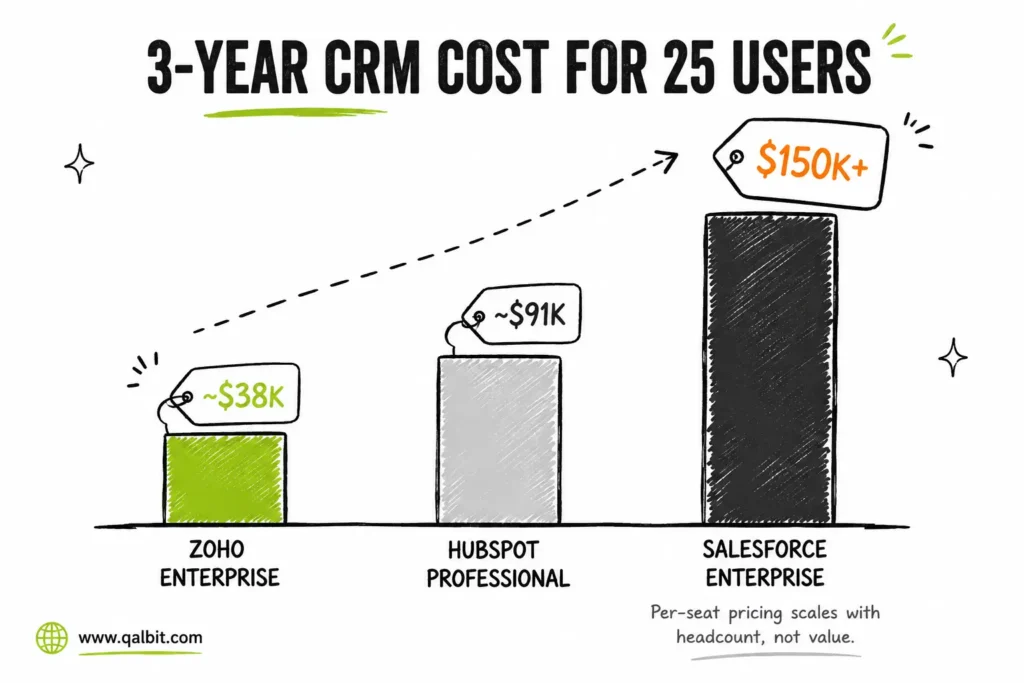
A few honest caveats. These are list prices; negotiated discounts of 10–30% are common at 25 seats, and month-to-month billing costs more than the annual rates shown. But the shape of the picture doesn’t change: per-seat pricing scales with your headcount, not with the value you get from each seat. Every person you hire makes the meter run faster.
When off-the-shelf is genuinely the right answer
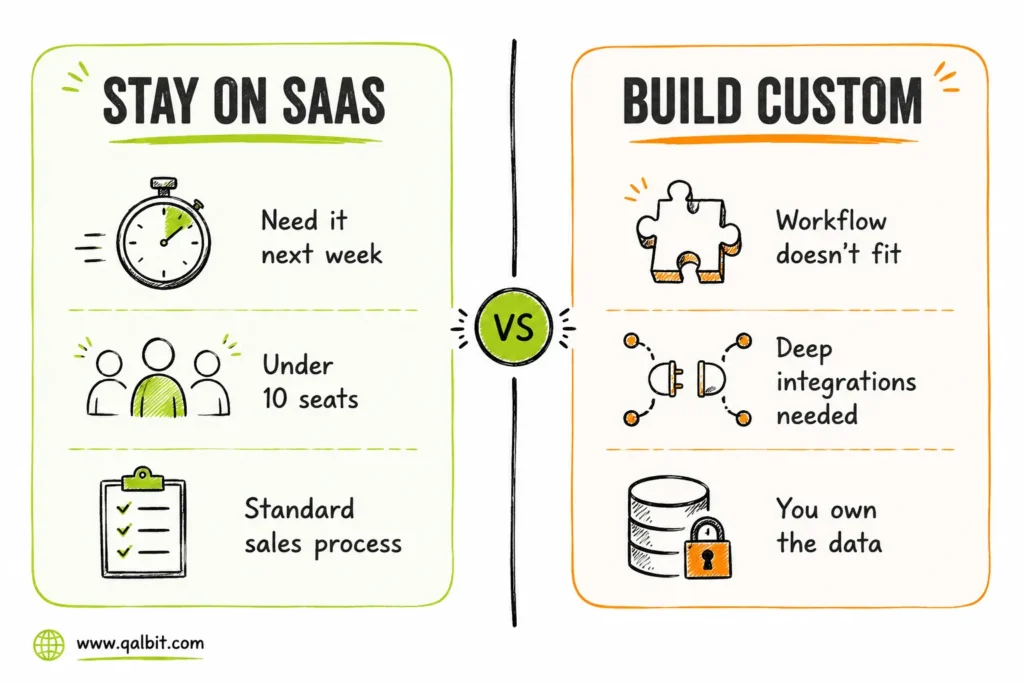
We tell about a third of the companies who contact us to stay on their current CRM. Buy — or keep — SaaS when:
- Your sales process is standard. Lead, call, proposal, close, with no unusual steps in between. Salesforce and HubSpot have spent twenty years refining exactly this flow, and you won’t beat it by building.
- You have fewer than ~10 seats and no integration pain. The licence math simply doesn’t hurt yet, and a build can’t pay for itself.
- You need a CRM next week. Nothing beats a same-day signup when speed is the only thing that matters.
- Your team already lives inside an ecosystem. If marketing runs on HubSpot’s content tools and everyone’s fluent in it, splitting the stack has real switching costs that a custom build won’t erase.
If that’s you, close this tab and keep your subscription. Seriously.
When a custom build wins
Build when one or more of these is true:
- Your workflow doesn’t fit their model. Real-estate site visits and inventory, healthcare patient journeys, fintech KYC steps, project-based selling, multi-branch approval chains — if your team is maintaining spreadsheets next to the CRM, the CRM has already failed at its one job.
- Licence bills outgrow your team. Per-seat pricing punishes growth. As our math above shows, at 25–50 seats three years of Salesforce licences can exceed the entire cost of building your own system. Our custom CRM cost guide has the full breakdown.
- Integrations are the whole point. If the CRM has to talk to your ERP, Tally or QuickBooks, telephony, WhatsApp and your product database, marketplace connectors get expensive and brittle fast. Custom integrations are built once, exactly for your stack, and they don’t charge you monthly to keep talking.
- You’re paying for a warehouse and using a shelf. Feature bloat isn’t harmless — it actively kills adoption, because every button nobody needs is one more reason the tool feels like someone else’s. Product research backs this up: Pendo’s feature-adoption study found around 80% of software features are rarely or never used. Sales teams stick with custom CRMs precisely because nothing on screen is wasted.
- Data ownership matters. Regulated industries, exit plans, AI ambitions — owning your customer data outright, in your own database, keeps every future option open instead of trapped inside someone’s export limits.
The three numbers to compare, not two
Almost every build-vs-buy analysis pits licence fees against build cost and stops there. Add the third number, the one that never shows up on an invoice: the cost of workarounds.
That’s the admin hours spent re-keying data between systems the CRM won’t connect. The deals lost to follow-ups the tool couldn’t model. The reporting quietly redone in Excel every month because the built-in dashboards can’t answer the question you actually have. For most companies we audit, this hidden workaround cost quietly exceeds the licence cost. A custom system doesn’t just replace the subscription — it deletes the workarounds too.
The hybrid path nobody mentions
You don’t have to rip out Zoho on day one. The lowest-risk route we build most often is phased:
- Keep the SaaS CRM and build only the missing piece — a quoting portal, a field-visit app, a custom dashboard — that syncs cleanly with what you already have.
- Prove that custom module with real users and measure whether adoption actually improves.
- Replace the core when the licence renewal comes up, migrating your history into the custom system on a deadline the renewal date sets for you.
Lower risk, no big-bang cutover, and the renewal date does the scheduling for you.
Custom CRM development: the honest cost
Since we’re being straight about SaaS pricing, here’s the straight version for building. A focused custom CRM MVP — the twelve features your team actually uses, done well — typically lands at $30,000–$75,000 for a first release, with a fuller, integration-heavy system running $50,000–$150,000+. Budget 15–20% of the build cost per year for maintenance and improvements. A well-scoped MVP can reach first value in 10–16 weeks.
Notice how that compares to the table above. A single Salesforce Enterprise three-year run can cost more than building and maintaining your own system outright — and at the end of the subscription you own nothing, while at the end of the build you own everything.
Decision checklist
Answer these honestly:
- Do we maintain spreadsheets alongside the CRM? (custom signal)
- Are we paying for more than 15 seats? (custom signal)
- Do we need 3+ integrations the marketplace doesn’t cover cleanly? (custom signal)
- Is our sales process genuinely standard? (SaaS signal)
- Do we need a CRM in under a month? (SaaS signal)
- Is the total budget under $10K? (SaaS signal)
Three or more custom signals? Run your real requirements through our free cost calculator to see what a build would actually cost for your team.
Frequently asked questions
It shouldn't even try. Salesforce is built to serve every industry on earth; your CRM only has to serve one — yours. Matching the twelve features your team truly uses takes 10–16 weeks. Deliberately skipping the other few hundred is the benefit, not the gap.
Your data lives in your own database from day one. That's the structural difference: even the worst-case custom scenario still leaves you owning everything, with full export access and no vendor holding the keys.
Yes. Contacts, accounts, deals and — in most cases — activity history export cleanly. Migration and deduplication are a standard part of any serious build quote, not an afterthought.
Often, at scale. For a 25-person team, three years of Salesforce Enterprise licences alone runs roughly $148,000 before implementation, while a custom MVP typically starts around $30,000–$75,000 plus 15–20% annual maintenance. Below ~10 seats the SaaS subscription usually wins; above ~25 seats the math frequently flips toward building.
QalbIT's CRM development team will map your actual sales process and give you a build-vs-buy recommendation — including, when it's the honest answer, "stay on Zoho."
