

Ask three vendors what an ERP costs and you’ll get three non-answers. The packaged-software crowd hands you a per-user price that looks fine on day one and stings at renewal. The big integrators won’t say a number until you’ve survived a couple of sales calls and a “discovery workshop.” Everyone talks around the question you actually asked.
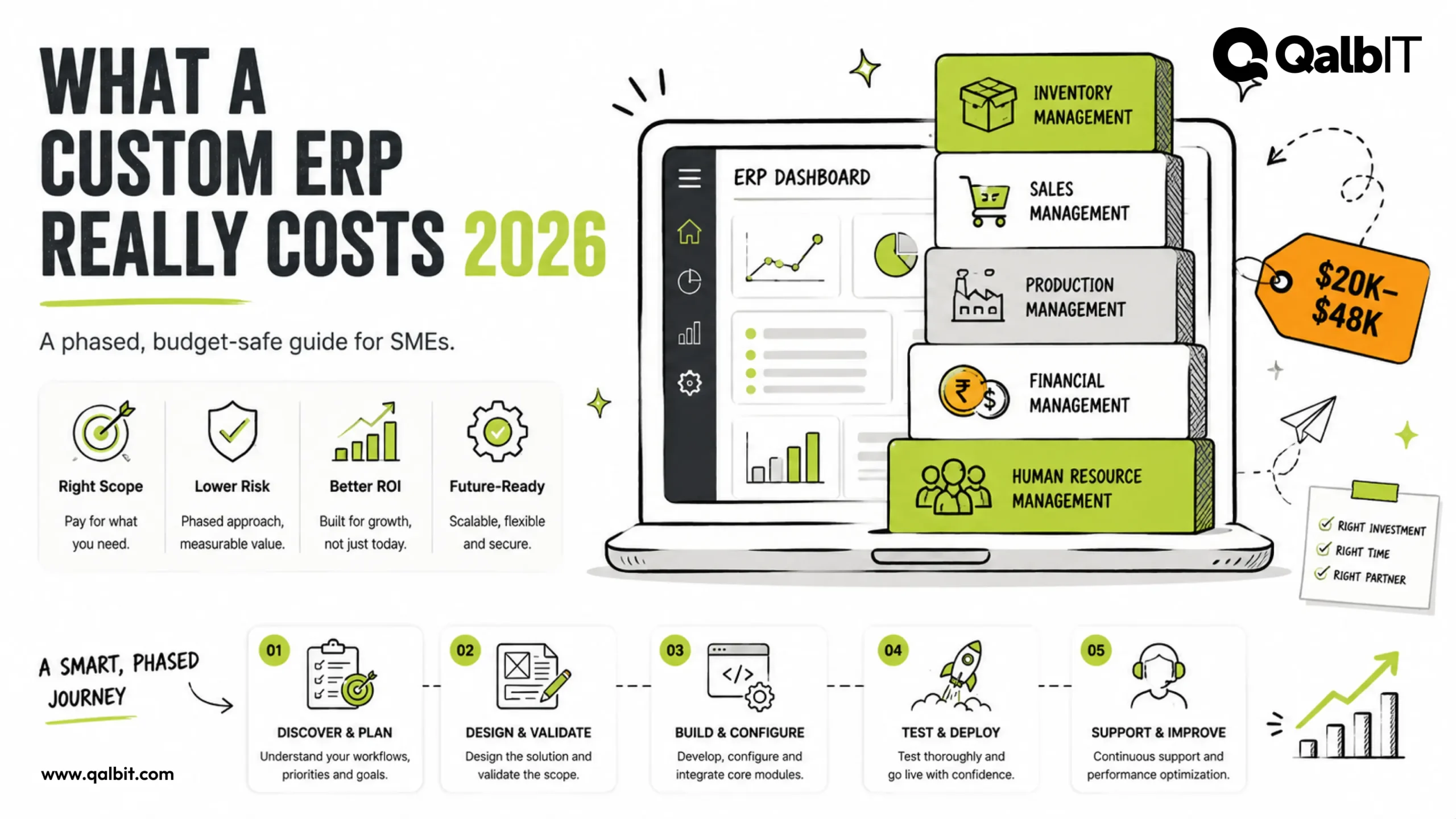
Let me just answer it. If you hire an experienced India-based team, a phase-one custom ERP — inventory, purchasing and sales for a single company — runs $20,000 to $48,000 in 2026. Below I’ll break that down module by module, point out the costs that quietly wreck budgets, and explain the phased approach we use to keep small and mid-sized businesses out of trouble.
Quick answer: how much does a custom ERP cost in 2026?
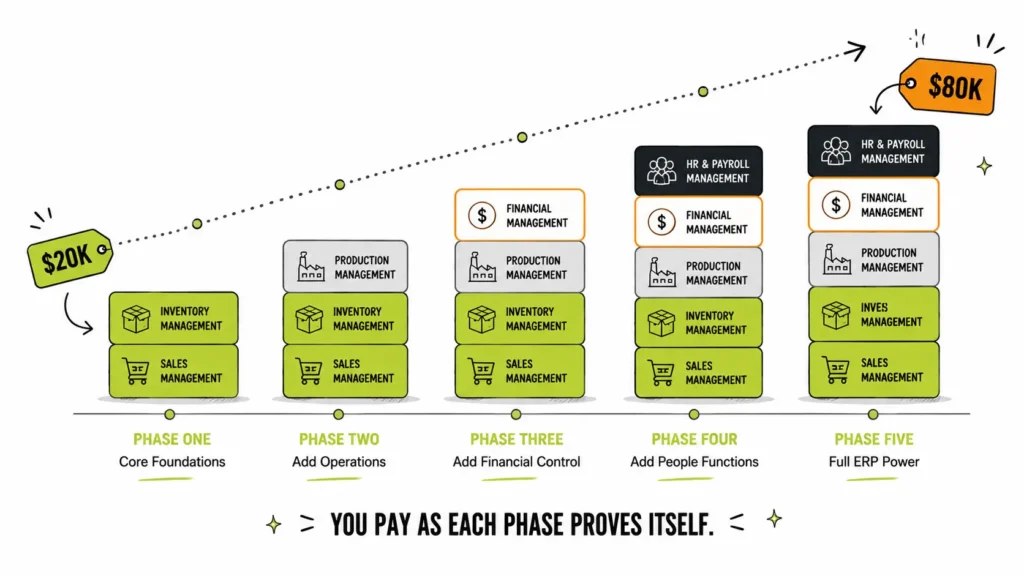
A tight phase-one build sits between $20,000 and $48,000. Once you layer in production, finance sync and HR — built out in stages rather than all at once — a full system lands around $45,000 to $80,000. Enterprise suites like SAP S/4HANA or Oracle are a different animal entirely: they open near $150,000 and comfortably cross $500,000 once you’ve paid for licences, integrators and change management. Most SMEs have no business going there, and I’ll happily talk you out of it.
| ERP scope | Cost (India-based team) | Timeline |
|---|---|---|
| Phase one: inventory + purchase + sales | $20,000 – $48,000 | 12–22 weeks |
| + Production / job-work module | +$10,000 – $20,000 | +5–8 weeks |
| + Finance & accounting integration (Tally, QuickBooks, Zoho) | +$4,000 – $10,000 | +3–5 weeks |
| + HR, payroll inputs & approvals | +$6,500 – $12,000 | +4–6 weeks |
| Legacy ERP rebuild (data-migration heavy) | $32,000 – $80,000 | 5–8 months |
Want a figure matched to your exact modules? Push them through our free cost calculator.
Why two quotes for the “same” ERP land 4× apart
You can send identical requirements to two shops and get numbers that differ fourfold. It isn’t dishonesty — it’s that “identical” requirements rarely are. Here’s what genuinely moves the needle.
How deep each module really goes. “Inventory” is a shape-shifter. For one client it’s a single warehouse and a running stock count. For the next it’s multiple locations, batch and serial tracking, barcode scanning and periodic stock audits. Same word, wildly different build. Before you compare a single quote, get each module scoped on paper.
The state of your master data. ERPs live or die on clean masters — items, parties, bills of material, locations. If yours are scattered across spreadsheets that three people maintain differently, someone has to clean and migrate all of it, and that someone costs money. This is the line item almost nobody puts in a quote, and it’s the one that most often blows up go-live.
Whether you rebuild accounting or just sync to it. For most SMEs the smart, cheap move is to keep whatever your CA already trusts — Tally, Zoho Books, QuickBooks — and sync to it. Rebuilding accounting from scratch, with GST, e-invoicing and audit-grade controls, adds $15,000 and up and a pile of risk you don’t need.
Big-bang cutover versus a parallel run. Running the old tools alongside the new ERP until the numbers reconcile costs you an extra three to six weeks of support. It is worth every rupee. Nearly every ERP horror story I’ve heard started with someone flipping the switch overnight and praying.
Who’s holding the keyboard. A phase-one scope a senior India-based team prices at $25,000 becomes a $70,000 to $100,000 project at US integrator rates. That’s a 3–4× gap driven by where the work happens, not how good it is.
The phased rollout that keeps your budget alive
Here’s the uncomfortable pattern: ERP projects fail when they try to change everything at once. Study after study shows a big share of implementations overrun their budgets and timelines, and the usual culprits are messy data migration and all-at-once cutovers. You don’t beat that with heroics. You beat it by phasing the work so no single misstep can take the business down with it.
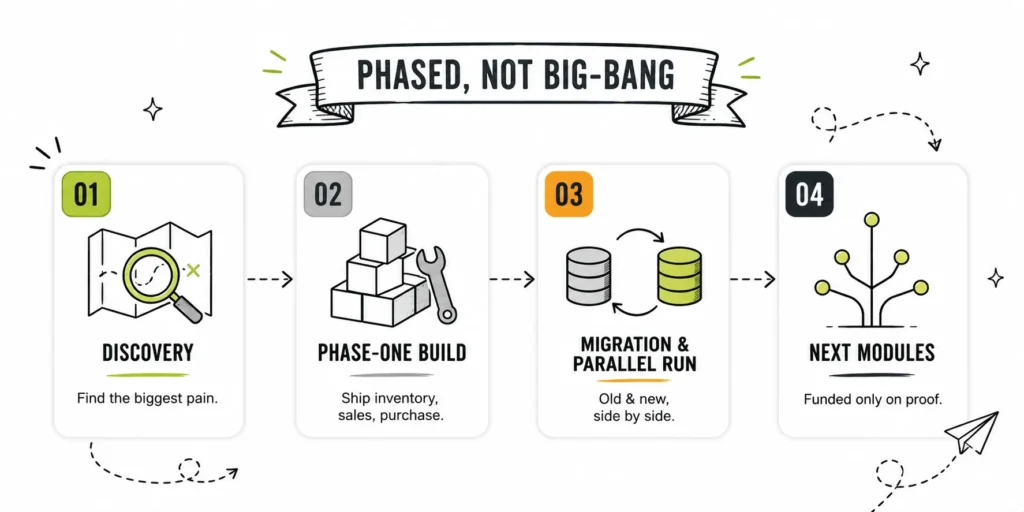
This is the order we follow on every custom ERP development project:
Discovery, two to three weeks. We map how order-to-cash and procure-to-pay actually run right now — WhatsApp approvals, the one Excel file only Rajesh understands, all of it. Then we find the module that’s hurting most and start there.
Phase-one build, six to fourteen weeks. Usually inventory, purchasing and sales. We demo weekly using your real items and your real customers, never dummy data, so the awkward problems show up early while they’re still cheap.
Migration and parallel run, three to six weeks. Masters and opening balances go in, supervisors get trained, and the old system keeps running until the daily numbers line up. Nobody bets the month-end on optimism.
The next modules — but only on proof. Production, finance sync, HR: each one gets funded after the last one has earned its keep on the floor, not before.
Every phase is fixed scope and fixed budget. You never commit to the whole number on day one, and you never pay for a module until the previous one has proven it belongs.
Custom ERP vs packaged ERP: the honest cost comparison
Odoo, SAP Business One and the rest look cheaper when you first open the pricing page. The five-year picture is where it shifts — per-user licences that climb with headcount, partners you’re required to hire for anything custom, and upgrade cycles you don’t get to opt out of. My rough rule: once you’re bending a third or more of a package’s default behaviour to fit how you work, you’re usually spending more than it would’ve cost to build the exact modules you needed — and you’re stuck with the licence bill on top.
I’ve written the full breakdown here: custom ERP vs Odoo vs SAP.
The short version I give clients: if your processes are standard, buy the package. If your processes are the reason you win, build.
What it costs to run once you’re live
The build price is only half the conversation. Budget for support from the start:
- A light retainer — 10–15% of build cost a year — covers bug fixes and small tweaks and nothing more.
- Full coverage — 15–20% a year — is the honest number for a business running critical operations on the system: SLAs, enhancements, new reports, monitoring.
- Packaged enterprise ERP support tends to run higher still, roughly 18–22% of licence value annually.
And here’s the part that compounds in your favour: a custom ERP has no per-user licences. Your 40th user is free. On a packaged suite, that’s another seat on the invoice, every single month.
Get your phase-one number
Run your modules through the software development cost calculator for a range in seconds — or just talk to our ERP team. We’ll map your operations and send back a module-by-module estimate, with a recommended phase one, inside 48 hours.
Frequently asked questions
Phase one runs three to five months — discovery, build, migration, training and a parallel run included. Full multi-module systems stretch across nine to eighteen months on purpose, so day-to-day operations never stall while the system grows around them.
Yes — and honestly, most SMEs should. A two-way sync for vouchers, invoices, payments and GST/e-invoicing flows costs a fraction of rebuilding accounting, and it keeps your CA working in a tool they already trust.
Hosting plus a support retainer — figure 15–20% of build cost a year for full coverage, or 10–15% if you only want fixes. No per-user licences, which is exactly why the total cost of ownership gets better as you scale, not worse.
For a focused phase one at India-based rates, yes — we've shipped them. What it won't buy is fourteen modules at once. Any vendor who says it will is planning to make up the difference in change requests later.
Upfront, the package almost always wins. Over five years it comes down to your headcount, how much you customise, and how unusual your processes are. If you're reshaping a package more than a third out of its default form, custom usually ends up cheaper and fits better.